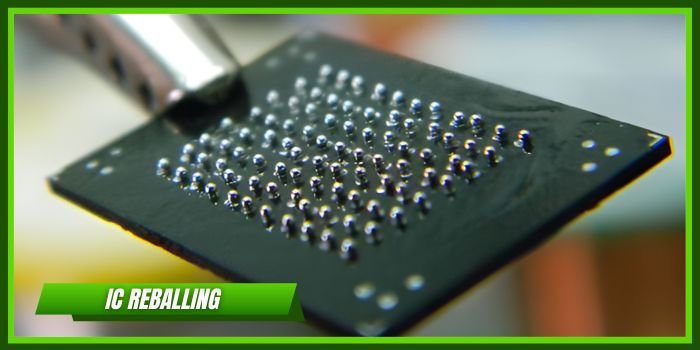
CPU reballing is one of the most advanced skills in mobile repairing. When a smartphone CPU develops dry solder joints or connection cracks, the device may show serious problems like no power, no display, no network, or auto restart. In such cases, CPU reballing can restore the motherboard without replacing the processor.
In this detailed guide, you’ll learn the complete CPU reballing process, required tools, expert tips, and common mistakes to avoid.
📌 What is CPU Reballing?
CPU reballing is the process of:
- Removing the CPU (processor) from the motherboard
- Cleaning old solder balls
- Applying new solder balls using a stencil
- Reinstalling the CPU correctly
Modern smartphones like iPhone 12 and Samsung Galaxy S22 use BGA (Ball Grid Array) processors, which require precision-level micro soldering skills.
🔍 When is CPU Reballing Required?
CPU reballing is needed when:
- Phone is dead with no short
- No network after fall damage
- No display but backlight present
- IMEI null (in some cases)
- Phone auto restart continuously
- Board flex issue (temporary on/off)
⚠ Important: Always confirm the fault before reballing. CPU reballing should be the last option.
🛠 Tools Required for CPU Reballing
Professional tools are very important:
- BGA Rework Station
- Hot Air Gun
- High-quality Flux
- Microscope (minimum 45X zoom)
- CPU Stencil (model-specific)
- Solder Paste or Solder Balls (0.25mm / 0.30mm etc.)
- PCB Holder
- Multimeter
- Thermal Camera (optional but helpful)
Without proper tools, CPU reballing can permanently damage the motherboard.
🔥 Step-by-Step CPU Reballing Process
Step 1: Motherboard Preparation
- Remove shields carefully
- Apply heat-resistant tape around nearby ICs
- Preheat board to avoid layer damage
Step 2: CPU Removal
- Apply flux around CPU
- Set correct temperature (usually 380°C–420°C depending on board)
- Heat evenly in circular motion
- Gently lift CPU using blade or suction tool
⚠ Never force-remove CPU. It can damage PCB pads.
Step 3: Cleaning the Pads
- Clean motherboard pads with solder wick
- Clean CPU bottom surface carefully
- Use IPA solution for proper cleaning
- Inspect under microscope
Pads must be flat and shiny before reballing.
Step 4: Reballing the CPU
- Place CPU in stencil
- Apply solder paste or solder balls
- Heat evenly until balls form properly
- Allow natural cooling
- Remove stencil carefully
Check under microscope for:
- Missing balls
- Joined balls
- Uneven ball height
Step 5: Reinstalling CPU
- Apply small amount of flux on PCB
- Align CPU correctly
- Heat evenly until it settles
- Let board cool naturally
After cooling:
- Check for short on VCC_MAIN line
- Test on DC power supply
- Reassemble and power on
🚨 Common Mistakes to Avoid
❌ Overheating the Board
Too much heat can damage internal PCB layers.
❌ Using Wrong Ball Size
Wrong solder ball size causes connection failure.
❌ Not Checking Short Before Power On
Always measure resistance before connecting battery.
❌ Poor Cleaning
Leftover solder or flux can cause short circuit.
❌ Skipping Preheating
Cold boards crack easily during CPU removal.
💡 Expert Tips for Better Results
✔ Always use original stencil for exact model
✔ Practice first on scrap boards
✔ Maintain steady hand movement
✔ Use proper lighting and microscope
✔ Keep temperature controlled (avoid extreme heat)
✔ Take full backup if possible (especially for Android storage pairing)
💰 Is CPU Reballing Profitable?
Yes! CPU reballing is high-value work.
In India, technicians charge ₹3,000 to ₹8,000 depending on the model and difficulty. Devices from brands like Apple and Samsung usually give higher profit margins.
Technicians who master CPU, NAND, and baseband reballing can build a strong reputation and earn premium income.
🎯 Final Conclusion
CPU reballing is not a beginner-level job. It requires:
- Proper training
- High-quality tools
- Circuit knowledge
- Patience and precision
If done correctly, CPU reballing can bring dead phones back to life and significantly increase your income in the mobile repairing field.