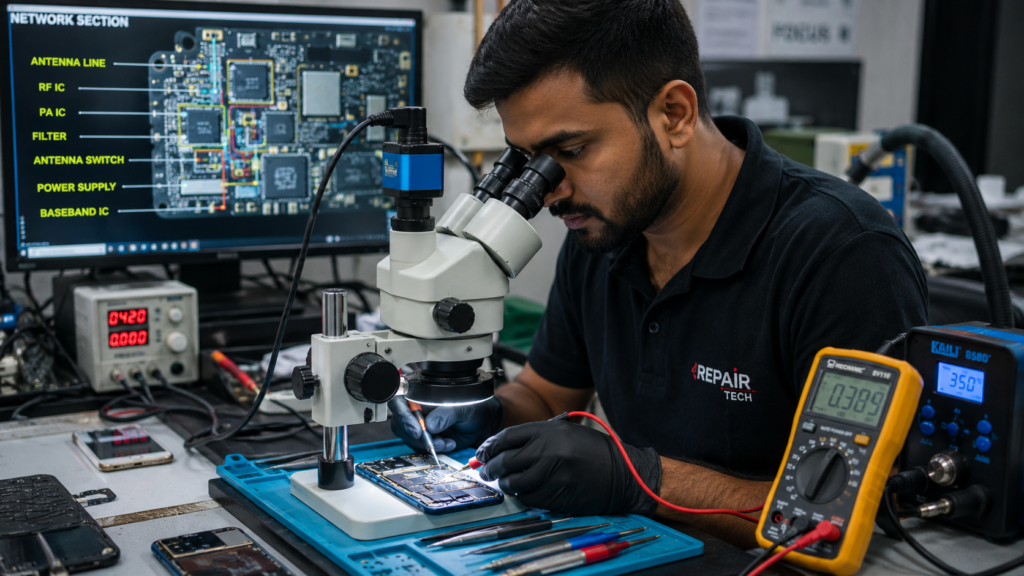
Mobile Network Problem Repair – Complete Guide to Fix No Signal & Weak Network Issues
Mobile network problems are one of the most common issues faced by smartphone users. Sometimes the phone shows “No Service”, “Emergency Calls Only”, weak signal, or frequent network drops. These issues can be caused by software faults, SIM card problems, antenna damage, or motherboard faults.
In this article, we will explain Mobile Network Problem Repair in simple language so that beginners and mobile technicians can easily understand the troubleshooting process.
Common Mobile Network Problems
The following network issues are commonly seen in Android and iPhone devices:
- No Network Signal
- Emergency Calls Only
- Weak Signal Strength
- Network Fluctuation
- SIM Not Detected
- No Incoming or Outgoing Calls
- Mobile Data Not Working
- Network Drops Frequently
Causes of Mobile Network Problems
1. SIM Card Fault
A damaged or old SIM card may cause network issues.
Solution:
- Insert another SIM card.
- Check SIM slot condition.
- Clean SIM contacts.
2. Software Problem
Corrupted software can affect network functionality.
Solution:
- Reset network settings.
- Update phone software.
- Flash stock firmware if required.
3. Antenna Damage
The antenna receives network signals from nearby towers. If damaged, the phone may show weak or no signal.
Solution:
- Inspect antenna connector.
- Check antenna flex cable.
- Replace damaged antenna.
4. RF Section Fault
The RF (Radio Frequency) section controls signal transmission and reception.
Components involved:
- RF IC
- PA (Power Amplifier)
- Antenna Switch
- Filters
If any of these components fail, the network may disappear completely.
5. Baseband IC Problem
The Baseband IC manages communication between the phone and the network tower.
Symptoms:
- Unknown Baseband
- IMEI Null
- No Service
Solution:
- Check software first.
- Reball or replace Baseband IC if necessary.
Step-by-Step Mobile Network Problem Repair Process
Step 1: Check SIM Card
- Test with another SIM.
- Verify SIM slot condition.
Step 2: Check IMEI Number
Dial:
*#06#
If IMEI is missing or shows NULL, repair software issues first.
Step 3: Check Baseband Version
Go to:
Settings → About Phone
If Baseband is Unknown, software or hardware repair is required.
Step 4: Inspect Antenna Line
Using a multimeter:
- Check continuity from antenna connector.
- Check antenna switch and filters.
Step 5: Check RF Section
Inspect:
- RF IC
- Power Amplifier (PA)
- Network Filters
Look for:
- Short circuit
- Physical damage
- Water damage
Step 6: Measure Power Supply
Check voltages supplied to:
- RF IC
- PA IC
- Baseband IC
Missing voltage may indicate PMIC or line faults.
Network Fault Finding Tips
✔ Always start with software checking.
✔ Confirm IMEI and Baseband before hardware repair.
✔ Check antenna section before replacing ICs.
✔ Use schematic diagrams for accurate diagnosis.
✔ Follow the signal path step by step.
Tools Required for Mobile Network Problem Repair
- Digital Multimeter
- DC Power Supply
- Schematic Software
- Microscope
- Soldering Station
- Hot Air Gun
- Network Tester
Conclusion
Mobile Network Problem Repair becomes easier when you follow a proper fault-finding process. Always begin with basic checks such as SIM card, IMEI, and software. If the issue persists, inspect the antenna line, RF section, and Baseband IC. Understanding the network signal path helps technicians diagnose and repair faults quickly and accurately.
By learning these techniques, beginners can successfully repair common mobile network issues and improve their mobile repairing skills.
Mobile Network Repair, No Signal Fix, Network Fault Finding, RF Section Repair, Mobile Repairing Course, Android Network Problem, iPhone Network Repair, contact Tech Guru GSM Assam Service